● New feature, free firmware update

BLE caberQU. X-Ray.

BLE caberQU already told you if a cable worked. X-Ray reads deeper — Thunderbolt, DisplayPort, and real active-cable internals your cable's chip is quietly reporting.

A free firmware + app update released on 10.10.2026. Every BLE caberQU needs it — new purchases included, since it doesn't ship pre-installed.

LIVE READ BLE caberQU · X-Ray

* shown when the cable's own chip reports it

What X-Ray reads

Every protocol your cable is (or isn't) carrying.

Six new read categories, pulled straight off the cable's own eMarker and active components — not guessed from a spec sheet.

PD

Power delivery, fully mapped

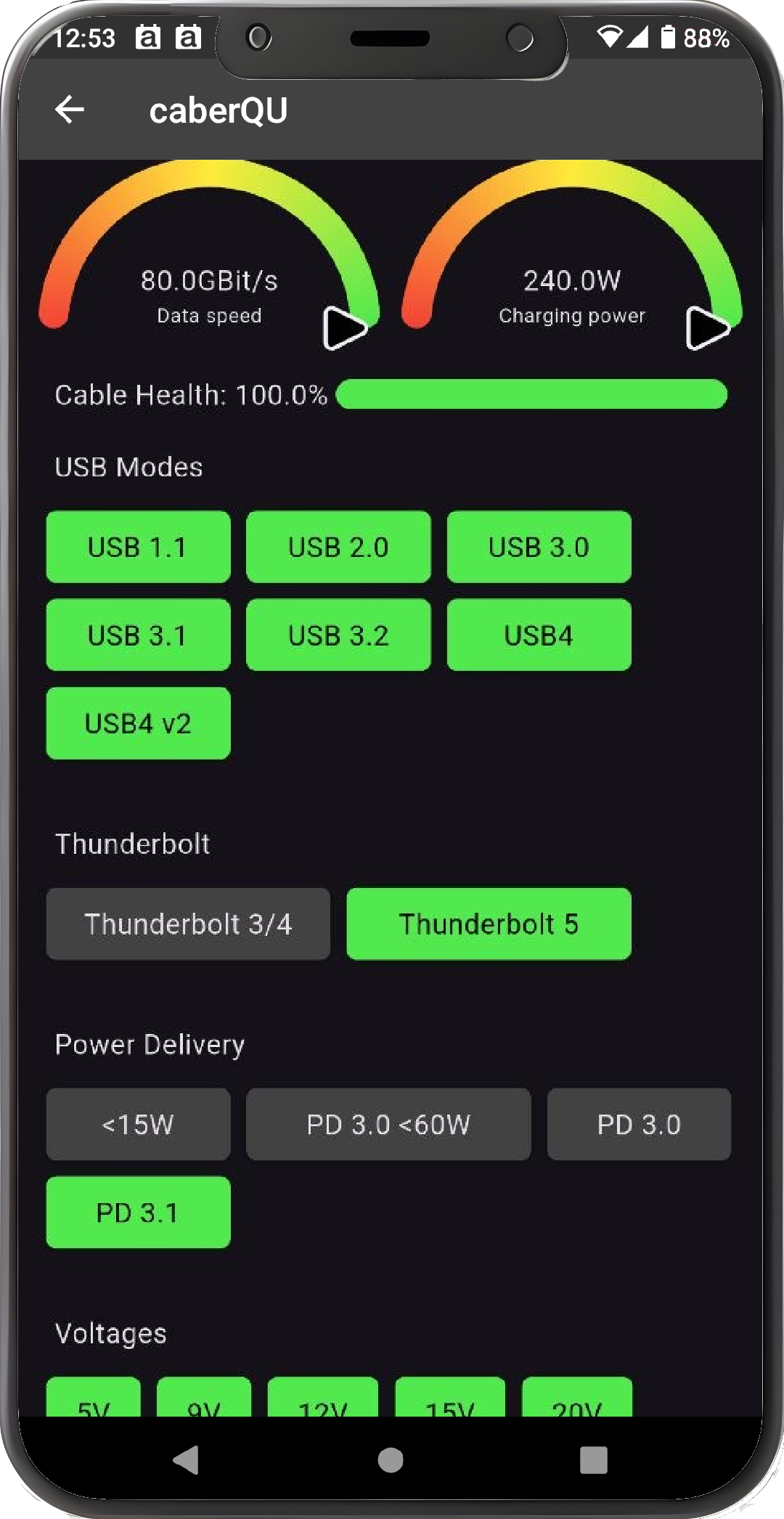
Distinguishes sub-15W profiles from PD3.0 above 60W, and flags PD3.1 EPR support.

TBT

Thunderbolt 3/4, or Thunderbolt 5

Tells Thunderbolt 3/4 apart from Thunderbolt 5, and reads retimer presence, LSRx, medium, TBT B-mode, speed and SVID alongside it.

DP

DisplayPort alt mode

Signal support, USB r2.0, DFP/UFP pin assignment and DP SVID, read directly from the cable.

eMarker

Deeper eMarker data

EPR status, latency and termination — plus up to four additional SVIDs. Chip manufacturer shows up when the cable reports it; we're steadily mapping more manufacturer IDs.

ACTIVE

Active cable internals

SBU type, VBUS path, PHY connection, active element, USB support and generation, lane count, asymmetry, hub hops and isolation.

CERT · BETA

Certificate check, early days

Checks a cable's certificate against a growing database. Coverage is still limited — a "not found" result isn't proof of a fake, just a cable we don't recognize yet.

caberQU app showing X-Ray cable diagnostics
In the app

Nothing you have to interpret yourself.

X-Ray reads land in the same caberQU app you already use — no new hardware, no new pairing. Plug in, and the full protocol picture is on screen in seconds.

  • 01 Connect the cable to BLE caberQU as usual
  • 02 Open the app over Bluetooth — same pairing as before
  • 03 X-Ray reads populate automatically: PD, TBT, DP, eMarker, active cable, certificate
Two ways in

Already own a BLE caberQU, or joining us new?

The update is free either way — how you get there is different.

Already own BLE caberQU

Your update is free. Your friends' discount isn't.

  1. Open the caberQU app and update to the latest firmware — X-Ray unlocks automatically.
  2. Enter your email below and we'll send your personal referral code.
  3. Share it: your friend gets 15% off, you get 15% off your next order.

One code per customer. Store-wide — use it on accessories, not just another tester.

New to caberQU

The X-Ray tester, ready to go, buy now, download update.

BLE caberQU testerincluded
Protective caseincluded
Screen protector—
USB4 cable—
USB-A adapter—
🏷 Code XRAY15 at checkout — 15% off
Get this bundle →

Prefer a different case/cable combo? Configure your own on the product page — enter the code above at checkout, it isn't applied automatically.